Wednesday, September 23, 2009

How to edit, crop, copy, combine and convert DVD?

How to edit, crop, copy, combine and convert DVD?

This the most question I received----how to rip DVD to AVI, WMV, MPEG, FLV, 3GP, MOV, VOB, ASF, MP4, etc, extrac audio from DVD to MP3, WMA, M4A, AAC, WAV, etc and edit DVD Movie with Aimersoft DVD Ripper.

If you want to know how to convert AVI, XviD, WMV, MPEG, MPG, FLV, DAT, RM, RMVB, MOV, ASF, H.264 to the format you want, you can learn the guide by clicking here: How to convert Video to other video audio files

This DVD Ripper guide includes 4 parts:
How to convert DVD to iPhone/iPod/PSP/Zune/Apple TV/Phone/PS3/Xbox 360/Zen/Pocket PC/AVI/MPEG/MP4.
How to edit, combine, effect and cut DVD movies?
How to extract and rip audio from DVD to MP3 for iPod nano, shuffle and other MP3 players?How to put DVD clips on Youtube, Myspace?

What you need is Aimersoft DVD Ripper; you can download it for free here:http://www.aimersoft.com/dvd-ripper.html#161

1. How to convert DVD to iPhone/iPod/PSP/Zune/Apple TV/Mobile Phone/PS3/Xbox 360/Zen/Pocket PC ?

Step1. Insert your DVD disc into your DVD-Rom, then run the software, click "Load DVD" button and add the DVD file. You can also add DVD/IFO from your hard disk by clicking "Load File"
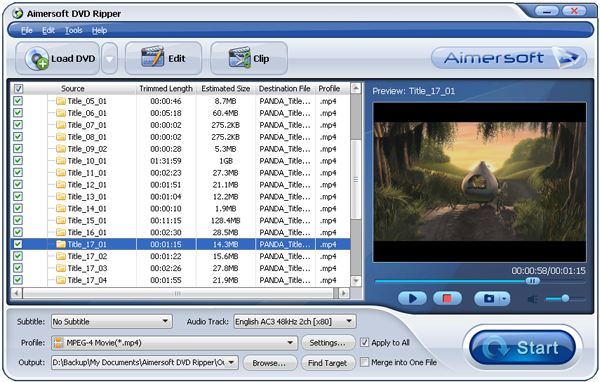


Step2. This software can convert DVD to various video formats such as MPEG-4, AVI, WMV, FLV, 3GP, VOB, etc. Click the "Format" drop down list to select a format. If you want to copy DVD to computer in 1:1 lossless quality, please select "Lossless DVD Copy (*.vob)"
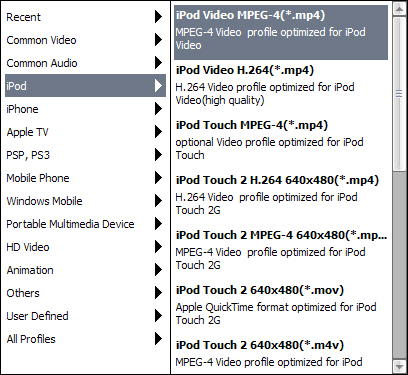


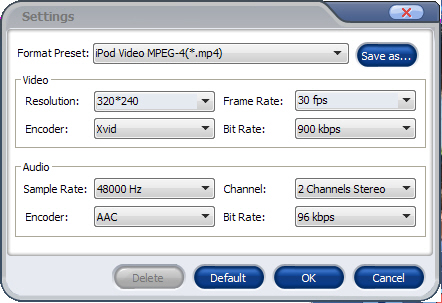
If you don't know much about mobile players, just select a format according to the name of your mobile player. For example, if you want to copy DVD to iPhone, just select "iPhone Video MPEG-4 (*.mp4)", and the default setting works great. If you want to customize the output video, you can click the "Settings" button next to the format field to open the Settings window and set video resolution, frame rate, bit rate, encoder, etc. See the figure below:


Step3. Select Subtitle and Audio
Regular DVD movies usually have several subtitles such as English, French, German, etc. You can select one you prefer. You can also delete the subtitle by selecting "No Subtitle". Selecting Audio is the same.



After the above steps, click "Start" to start conversion.

Free download Aimersoft DVD Ripper

Tuesday, September 22, 2009

How to copy DVD to computer and hard drive? (copy protected DVD included)

How to copy DVD to hard drive or PC confused us When we clone dvd to our hard drive or PC, we can found that most commercially produced DVDs (like DVDs you buy in stores) are protected by CSS, region code and some others, which bring a great trouble for us to copy protected DVDs for backup and sharing it with families. Here is quite an easy way to clone DVD (includes home-made and copy protected DVD) with a usualful DVD copy software:

Tools you need: an easy-to-use DVD Copy software, a DVD burner and a writable DVD disc, you can download Aimersoft DVD Copy which can clone DVD from DVD9 to DVD5, DVD5 to DVD9, DVD9 to DVD9 and DVD5 to DVD5 to help you. You can use it to copy only main movie, or to select Custom Mode, preview desired titles and then copy the customized DVD. It is free for 3 times with no functional restriction.

How to copy DVD Step 1: Download Aimersoft DVD Copy and install it, Vista uses may select "Run as Administrator".

How to copy DVD Step 2: Select DVD Source.

After Aimersoft DVD Copy has been successfully installed, run it and insert the DVD Disc you want to copy, then locate the DVD source. Even you have inserted a copy protected DVD, Aimersoft DVD Copy can remove the copyright protection automatically and copy protected DVD successfully.


How to copy DVD Step 3: Select DVD target:Click the “Target” drop-down list to select a target for output DVD. You can save DVD to a folder on your hard drive or to copy DVD to a blank DVD disc directly, or to copy DVD to an ISO file.


For DVD Disc:Aimersoft DVD Copy supports all popular DVD discs which include: DVD–5 and DVD–9; DVD-R, DVD+R, DVD-RW, DVD+RW, DVD+R DL, DVD-R DL, and DVD-RAM.

If you are copying a DVD disc from your DVD-ROM to a blank DVD disc, Aimersoft DVD Copy will ask you to insert a blank DVD disc when the program gets ready to burn. Then you can just take the original DVD disc out and insert a blank DVD disc.

But if you have two or multiple DVD Burners, you just need to change object DVD to another DVD burner and insert a blank disc into it , then Aimersoft DVD Copy for Mac will automatically copy DVD movie to the new DVD disc. No need to wait for the conversion to insert a new blank DVD disc.

For DVD Folder: If you want to backup your DVD movie to DVD folder or ISO image file on your hard drive, you can select between “DVD Folder” and "Image File" option, and specify a directory to save the copied DVD movie.

How to copy DVD Step 4: Select Copy ModeClick the "Copy mode" drop-down list you will see three options: "Full Movie", "Main Movie", and "Custom Mode".

Full Movie: If you want to copy the whole videos from the dvd disc, you can select "Full Movie" mode;

Main Movie: If you only want to clone DVD with the main movie, not the feature, the introduction of upcoming movies or other info that are not related with the movie you want, just select the "Main Movie" mode;

Custom Mode: if you want to copy DVD withthe exact title, you can select "Custom Mode" and preview to check your desired ones.


After all things done, click "Start" to start copying DVD movie or burning it to a new DVD disc. That's all.

Free download Aimersoft DVD Copy here